Mutual fund exit load ek scheme-specific charge hai jo kuch redemption ya switch-out requests par apply ho sakta hai. Amount samajhne ke liye teen cheezein check karein: aapke units ki allotment date, scheme ki applicable rule aur redemption ke liye lagne wala NAV. Is guide mein fictional examples se dikhaya hai ki ek hi folio mein purane aur naye units ka charge different kaise ho sakta hai aur bank credit ko statement se kaise match karein.
Mutual fund exit load ka basic meaning
Mutual fund exit load ko ek particular transaction ke context mein samjhein. Aapne scheme mein invest kiya, units allot hui aur later kuch ya saari units redeem karne ki request di. Scheme document mein likha ho sakta hai ki specific period ke andar units redeem karne par applicable portion se charge deduct hoga. Scheme mein nil exit load ho sakta hai ya alag time periods aur conditions ke hisaab se formula change ho sakta hai.
SEBI Investor ki exit load explanation investor education examples deti hai. Apne case mein wahi percentage copy karke calculation na karein. Apni scheme ka full name, plan aur relevant transaction date confirm karein. Mutual fund exit load compare karte samay official fund-house documentation aur applicable load terms ko calculator inputs banayein.
AMFI ki NAV explanation ke hisaab se redemption price mein exit load incorporate ho sakta hai, jahan applicable ho. Agar app gross value aur redemption amount dono separate dikhata hai, labels padhein. Gross number ko expected net bank credit samajhne se baad mein mismatch dikh sakta hai.
Charge ko applicable units par kaise calculate karein?
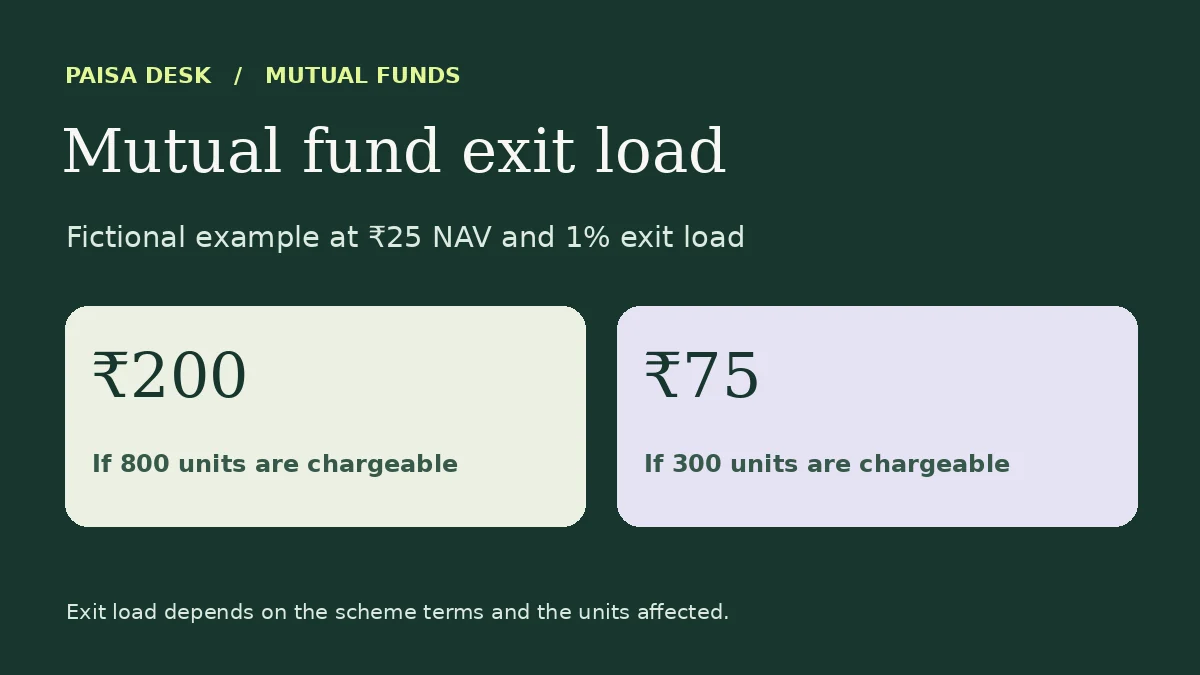
Mutual fund exit load ki illustration ke liye maan lijiye aap 800 units redeem kar rahe hain aur applicable NAV ₹25 hai. Gross value 800 × ₹25, ya ₹20,000 hai. Agar example scheme mein saari 800 units par 1% exit load apply ho, to hypothetical charge ₹200 hoga. Is simplified calculation mein other deductions ignore kiye gaye hain. ₹19,800 charge deduct karne ke baad ka illustrative amount hai.
| Input | Example value |
|---|---|
| Units redeemed | 800 |
| Applicable NAV | ₹25 |
| Gross proceeds | ₹20,000 |
| Illustrative rate on all redeemed units | 1% |
| Illustrative load | ₹200 |
| Remaining before other applicable deductions | ₹19,800 |
Agar isi example mein charge sirf 300 units par apply ho, charge base 300 × ₹25, ya ₹7,500 hoga. Usi 1% assumed rate par ₹75 result hoga. Gross proceeds ab bhi 800 units ke liye ₹20,000 hain. Mutual fund exit load ka base identify karne se aap full redemption amount aur chargeable unit amount ke beech difference samajh paate hain.
NAV ka estimate aur actual applicable NAV mismatch ho sakta hai. Agar aap calculation ek previous-day NAV ₹25 se karte hain aur request ke statement mein applicable NAV ₹24.80 hai, result accordingly revise hoga. Comparison karte waqt exact units, NAV, load aur final payout same transaction entry se uthayein. Rounding differences ko alag note karein.
SIP mein purani aur nayi instalments ka effect
SIP ki registration date ke baad multiple allotment entries hoti hain. Maan lijiye aapki SIP January se June tak six deposits ki hai. Har deposit ki units quantity aur allotment date alag ho sakti hai. Agar illustration mein load window units ki allotment date se count hoti hai, January aur June ki units ko same age ki tarah treat karna amount estimate bigaad sakta hai.
Mutual fund exit load calculate karne se pehle folio statement se relevant allotment rows nikalein. Example calculation ke liye date, units, remaining units aur applicable rule columns rakhein. Agar request partial hai, AMC ya scheme documentation ki unit selection rules confirm karein. Kis purchase lot se kitni units redeem hongi, yeh assumed ordering se decide na karein.
Agar ek folio mein 900 units hain aur aap sirf ₹10,000 redemption request raise karte hain, requested rupees aur processed unit count dono note karein. Request amount ka displayed unit estimate execution se pehle badal sakta hai. Actual allotment rows ke saath transaction statement compare karna final reconciliation ke liye useful hota hai. SIP schedule ka context chahiye to Paisa Desk ka SIP guide dekhein.
Scheme document mein exact rule kahan dekhein?
Fund house ki scheme page se latest Scheme Information Document, ya SID, aur applicable addenda dekhein. Search box mein load, exit, redemption aur switch-out terms try karein. Sheet mein plan label aur date record karein. Agar public summary aur detailed document ke beech wording different lagti hai, AMC se specific allotment dates aur planned transaction type ke liye written clarification maangein.
Mutual fund exit load rules mein sentence boundary ka effect ho sakta hai. “Within” aur “on or before” jaise words applicable dates interpret karne mein different result de sakte hain. Charge-free date assume karne se pehle document ka exact wording aur processing date verify karein. Agar weekend ya non-business day involve ho, fund house se transaction treatment check karna appropriate hai.
Mutual fund exit load terms mein kabhi percentage aur exemption dono same section mein hote hain. Maan lijiye illustrative document mein up to a specified number of units ke liye exemption mention hai. Sirf highlighted percentage padhkar total charge estimate na karein. Pehle check karein ki exemption kis amount, date, plan ya event ke liye valid hai, aur use apply karne ka order kya hai. Particular rule unclear ho to order submit karne se pehle official confirmation useful hai.
Exit load, expense ratio aur tax alag kyun hain?
Mutual fund exit load transaction-specific ho sakta hai. Scheme operating expenses ka treatment NAV aur published expense disclosure se samjha jaata hai. Tax alag rules aur individual circumstances par depend karta hai. Statement ka ek deduction dekhkar automatically use tax, platform fee ya load identify karna reconciliation error create kar sakta hai.
Paisa Desk ka Direct vs Regular plan guide recurring expense comparison samjhata hai. Exit load ka example us expense comparison mein copy karna sahi base nahi deta. Direct aur Regular plan ka exact name dekhne ke saath scheme redemption rule aur aapke allotment details separately read karein.
Agar bank mein expected amount se kam credit aaya, pehle AMC transaction statement open karein. Reporting display mein gross proceeds, NAV, units aur payable amount ka breakdown mil sakta hai. Available breakup ke basis par difference mark karein. Koi amount unexplained ho to screenshot ke guess par depend karne se pehle AMC ke official support ko transaction reference aur dates dein.
Switch-out aur redemption difference kaise track karein?
Switch request mein ek scheme ya plan se units exit aur doosri scheme ya plan mein entry reflect ho sakti hai. AMFI ki NAV guide redemption price definition mein switch-outs ka reference deti hai. Submit karne se pehle source units ki applicable load policy aur destination allotment terms separately dekhein. Bank account mein incoming credit na dikhe to isse source scheme side par charges zero hona prove nahi hota.
Switch confirmation preserve karte waqt two-sided record rakh sakte hain: source folio, units out, applicable source NAV aur source value. Doosri line mein destination scheme, amount applied, destination NAV aur units allotted. Mutual fund exit load applicable ho to use source transaction ke note mein rakhne se destination units less dikhne ka possible reason investigate kar sakte hain.
Agar source aur destination records alag working dates par generate hote hain, dono timestamps separately note karein. Transaction reference match karein aur any unresolved amount AMC se confirm karein. Choice ko sirf small fee estimate par judge karne se aap other relevant factors overlook kar sakte hain, jaise scheme risk, timing aur tax treatment.
Statement mismatch ka ek worked example
Maan lijiye app ne 800 units par ₹20,000 gross show kiya aur transaction statement par load amount ₹75 dikh raha hai. Aapki initial worksheet ne saari units par 1% use karke ₹200 calculate kiya tha. Difference ka first check hai ki rate galat thi ya rate sahi thi lekin charge base alag tha. If AMC confirms load applicable units 300 thi, to ₹25 NAV ke saath ₹75 expected result banta hai. Ye fictional example partial charge base ko isolate karta hai.
Mutual fund exit load difference document karne ke liye worksheet mein original estimate aur final calculation alag columns mein likhein. Reason cell mein “300 units chargeable, 500 exempt” jaisi factual line likhein, agar statement ya official confirmation usse support karta ho. Future reconciliation mein aap charge base aur rate ko independent inputs ki tarah review kar payenge.
Agar transaction statement net amount aur bank credit mein abhi bhi difference hai, extra deduction ka label, credit date aur same reference check karein. Mutual fund exit load verify ho jaane se remaining unexplained balance automatically resolve nahi ho jaata. Unexplained amount par official support se breakup maangein. Is example mein tax, platform fees aur any applicable charges intentionally separate hain.
Mutual fund exit load verify karne ke 7 checks
- Folio, scheme, plan aur transaction type identify karein.
- Units ki allotment dates aur remaining balance nikaalein.
- Official SID aur applicable addendum ka relevant section read karein.
- Chargeable units aur applicable rate alag note karein.
- Gross value ke liye actual applicable NAV use karein.
- Load, other deductions aur expected bank credit ko separately compare karein.
- Unexplained difference ho to official AMC ya RTA channel se confirmation lein.
Mutual fund exit load samajhne ka sabse practical record ek hi worksheet mein teen cheezein dikhata hai: applicable rule, affected units aur charge ka mathematical breakup. Fictional rate ya past example ko apne investment par directly apply karne se pehle current documentation verify karein. Agar koi entry clarity maangti hai, request status aur source document saath rakhkar fund house support se exact question puchhein.